
Below Zero Productions
Wakehouse: website, register, TV menus, and team tools.
Explore Wakehouse’s custom menu manager, native register, TV menus, employee scheduling, and time-off workflow with light-mode demonstrations.
Wakehouse / connected software
 One menu. Connected tools.
01Website menu
02Native register
03TV menu screens
System overview
 Wakehouse register ↗
Wakehouse needed more than a place to publish a coffee menu. The project connects structured drink records with public menus, a custom iPhone and iPad register, and an Apple TV menu application. Employee scheduling, time-off approvals, and a separate employee app extend the same website into day-to-day operations.
Behind the website / Wakehouse Espresso
Wakehouse: more than a website.
A custom menu manager, native register, animated Apple TV menus, and employee tools connect through the website. Explore the actual apps and light-mode administration interfaces.
Built for the business
One menu.
Everywhere it matters.
WebsiteRegisterTV menusTeam tools
Custom management tools. Connected customer experiences. Explore the system below ↓
Inside the system
Your menu. Your register. Your team.
See the actual apps and management interfaces built for Wakehouse.
App and plugin views are captured from their source. Employee and review records are fictional samples; payroll and analytics show empty datasets. No private business records are shown.
On the big screen
The actual animated Apple TV menu.
The native tvOS app brings the menu to life with animated drink visuals, a moving backdrop, and rotating menu pages—all using the website’s menu content.
At the counter
Your register, running on an iPad.
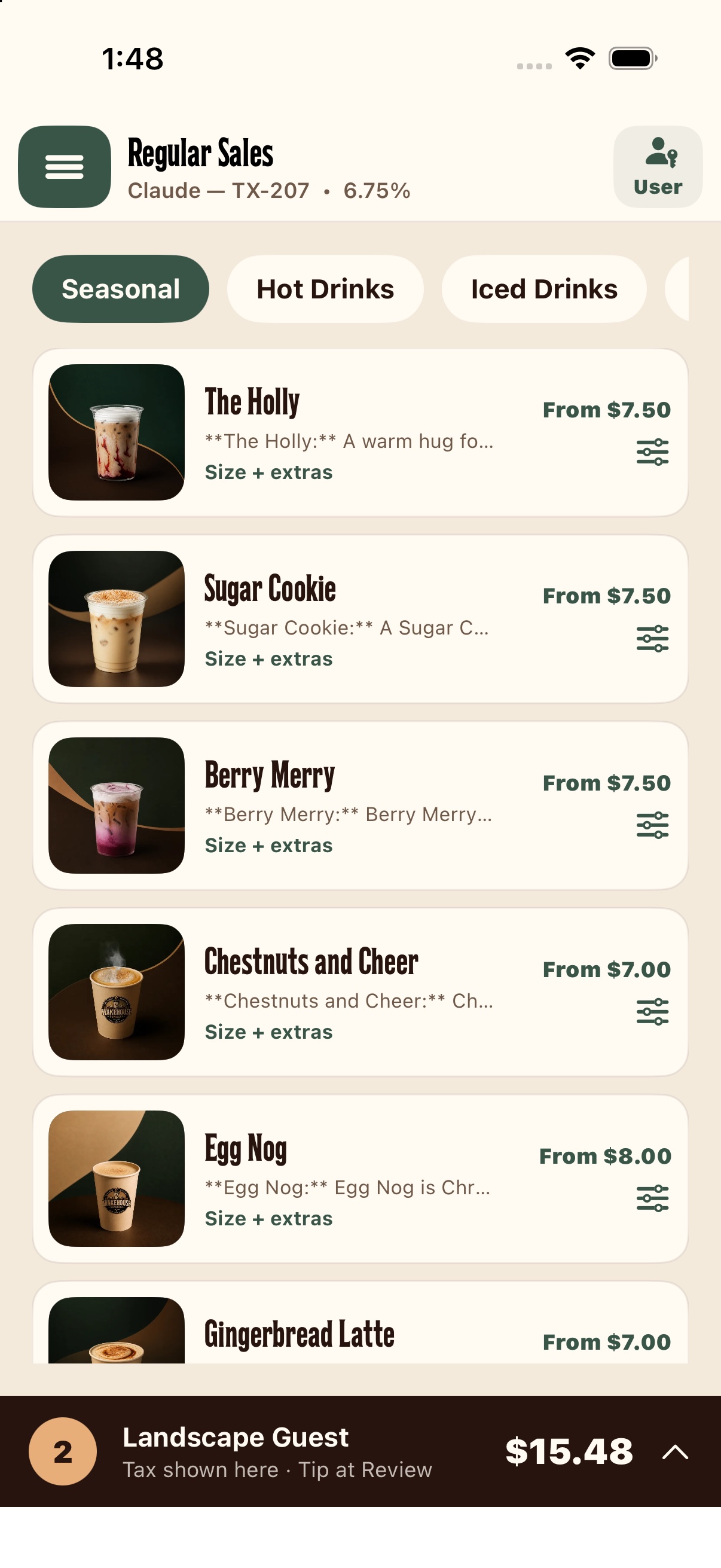
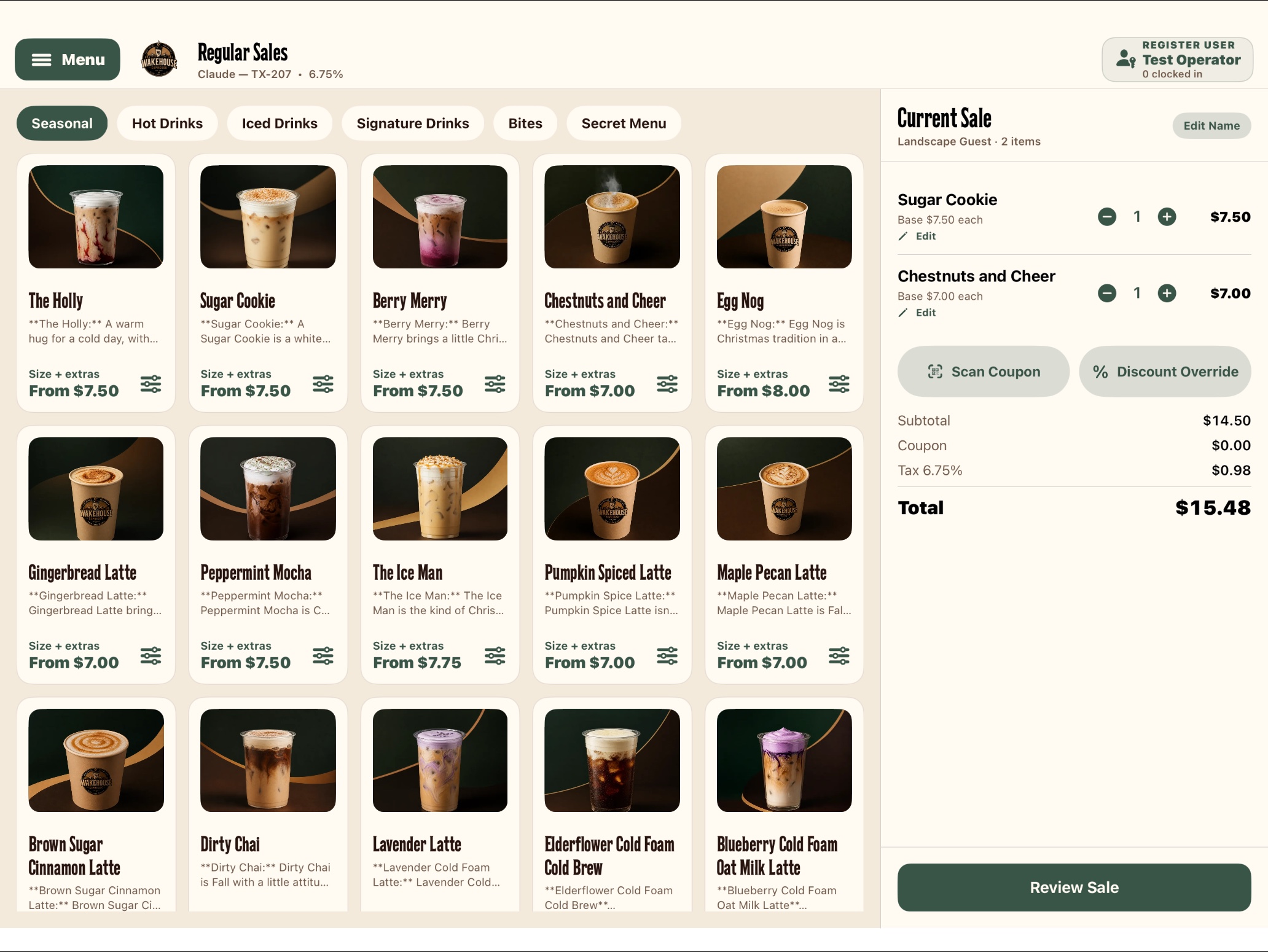
This is the actual SwiftUI register: the menu grid, size and extras controls, current sale, coupon scanning, and review action. Drink imagery and prices come from the public menu feed.
The register also supports tax and tips, corporate-event modes, saved menu data, and locally stored orders that retry website sync when connectivity returns.
Receipt-printer and cash-drawer integrations are implemented. Card payments remain a test-mode development flow.
In the team’s hands
The next shift. The request. The response.
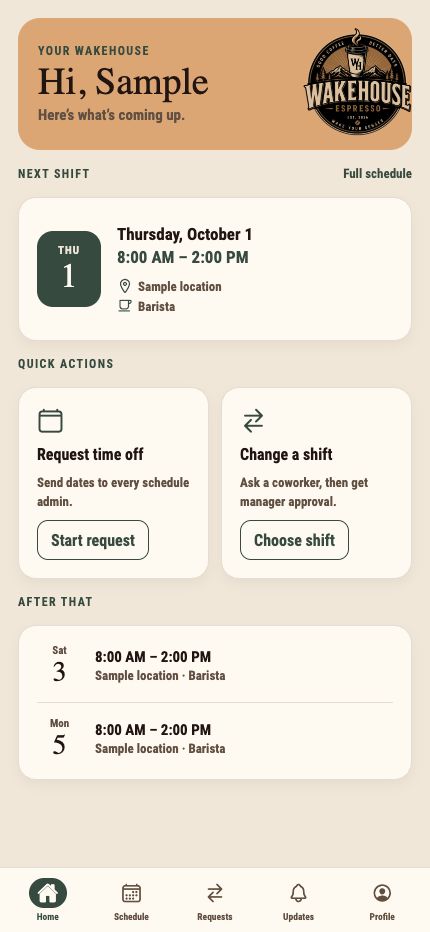
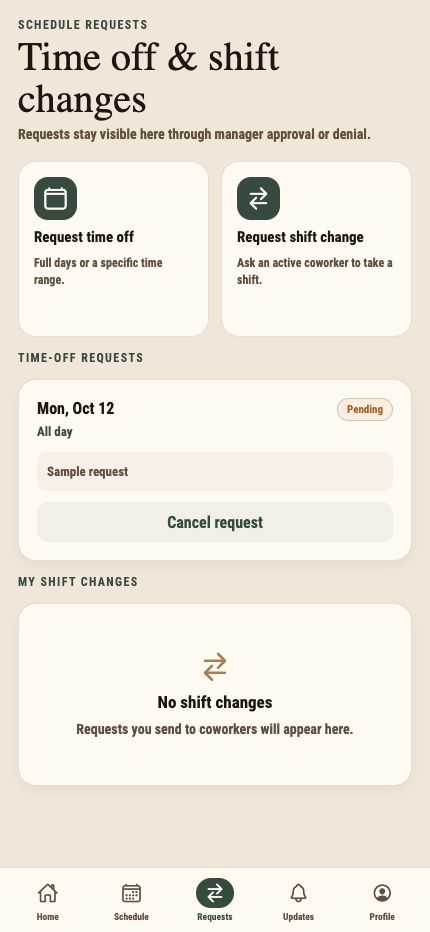
The employee app opens with a personal next-shift view and quick actions for time off and shift changes. Requests remain visible through the approval process.
Schedules, coworker requests, notifications, profiles, and guided photo capture connect to the website through the employee API.
Behind each pay period
Timecards. Approval. Payroll records.
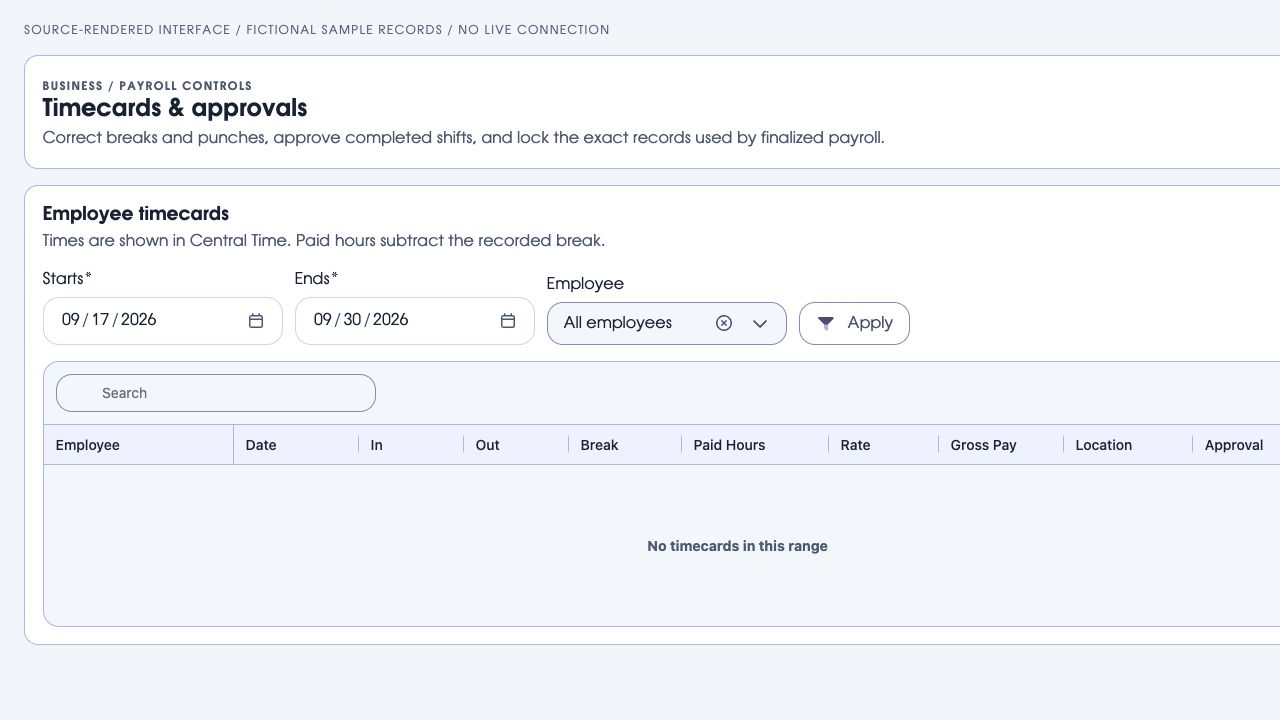
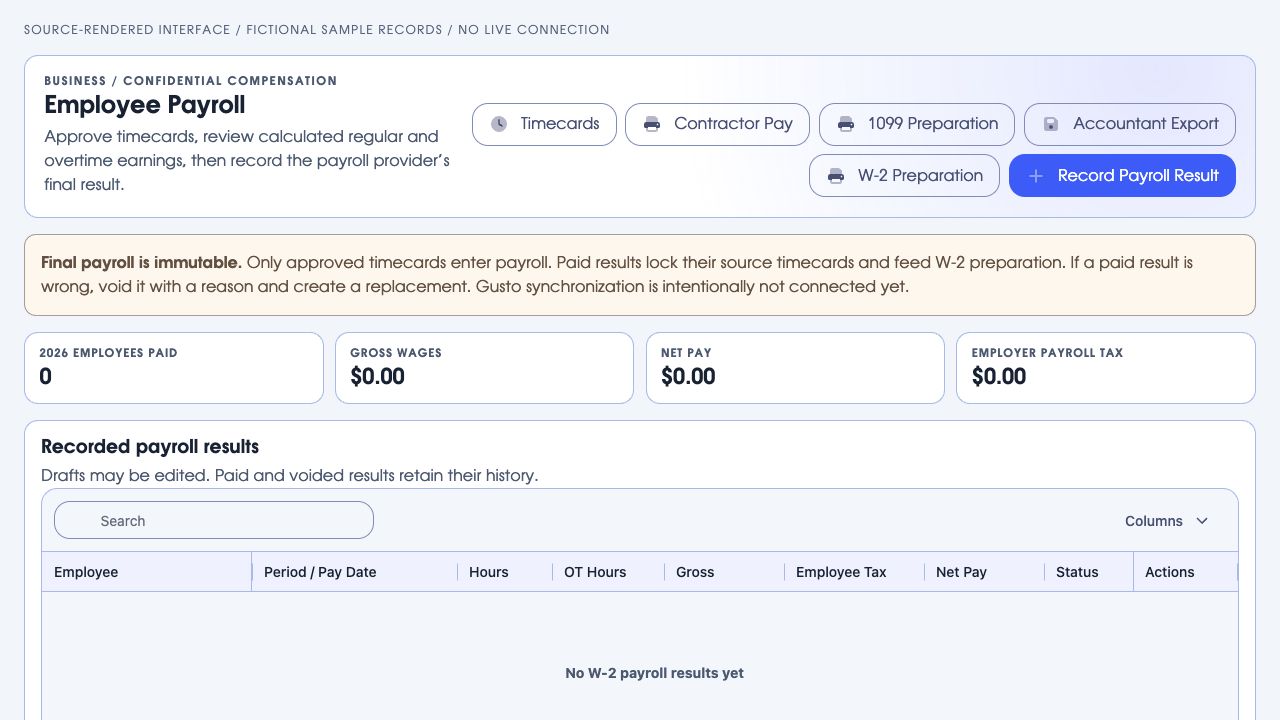
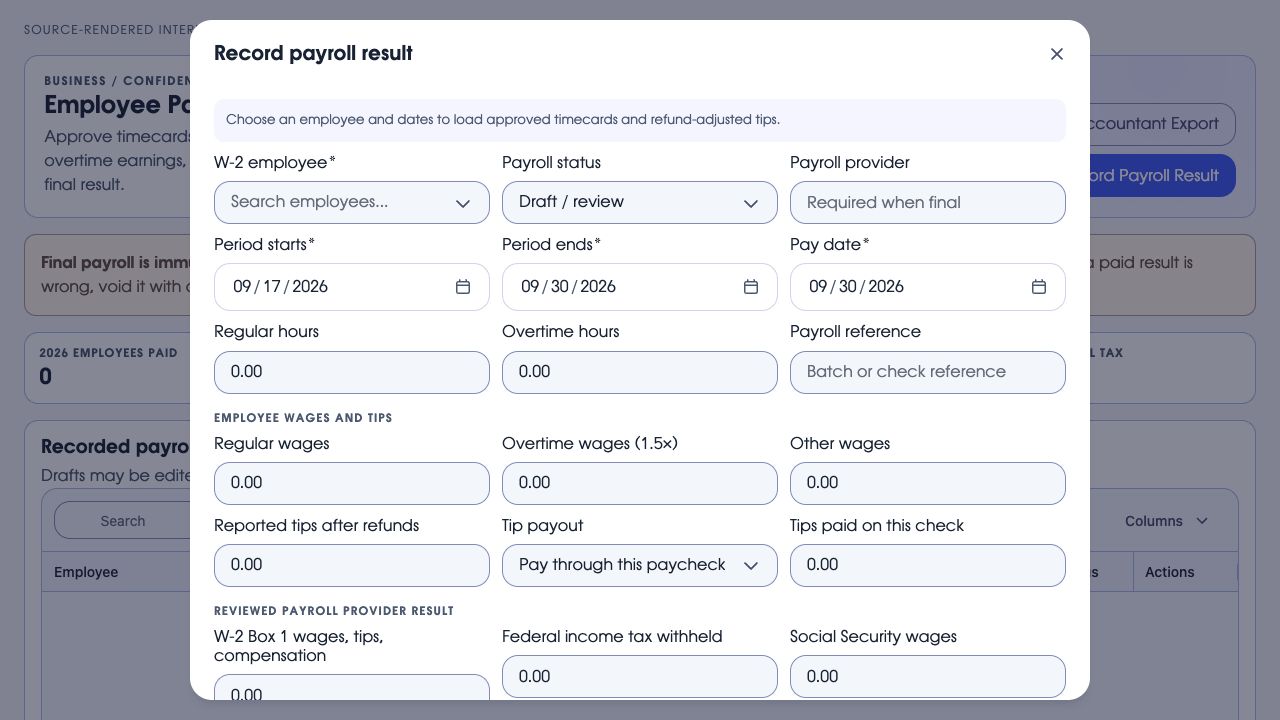
The actual timecard grid includes punches, breaks, paid hours, and approval controls. Payroll tools review regular and overtime earnings, refund-adjusted tips, and the provider’s final result.
Accountant exports, paid and voided history, contractor pay, and W-2/1099 preparation have separate workflows. These tools prepare and retain payroll records; they do not replace the payroll provider or automatically file taxes.
Coupons & register sync
Validate offers against website records and redeem them on completed orders.
Corporate events & invoices
Corporate-order tracking and invoicing tools support work beyond a regular counter sale.
Sales & inventory
Sales reports, inventory management, locations, and device administration sit alongside the menu.
These sample controls explain how shared records connect the systems. The actual app and plugin interfaces are shown above.
 Below Zero Admin Portal
Wakehouse Espresso / Drink Menu plugin
Edit once. Choose where it appears.
Try the sample controls, or play the guided clicks. Website menus use the saved record; TV screens refresh automatically and the register receives changes on its next menu sync.
Website menu
Maple latte$5.50
Hidden on this channelTV menu screen
Maple latte$5.50
Hidden on this channelRegister catalogue
Maple latte$5.50
Hidden on this channelPrintable menu
Maple latte$5.50
Hidden on this channelRendered from the project’s menu-editor code with sample content. This reference view is non-interactive; use the simplified controls above to try the connection.
Simplified demonstration of the actual menu fields and channel controls. Samples update together here to explain the connection; they do not update Wakehouse’s live systems.
Custom iPhone + iPad software
The website’s menu, at the counter.
The register downloads the same menu records, prices, size choices, availability, and images used by the website.
- Drink sizes and extras become order choices.
- Website coupons can be scanned or entered.
- Saved menu data remains available offline.
- Orders are stored on the device and queued for website bookkeeping sync.
- Clock-in tools and employee schedules connect staff operations with the website.
Employee Schedule plugin + employee app
A request on the employee side. A decision in the admin.
Website employee accounts, saved locations, shifts, and requests belong to the same system. This sample shows the approval flow without exposing staff records.
Request time off
No sample request sent.
Time-off requests
No pending requests.
Shift exchanges add a coworker response before final manager approval. The employee app shows personal schedules, request status, and notifications.
Built around how Wakehouse operates.
Menu presentation
Drink images, availability, size prices, ingredient visibility, and per-channel controls.
Native TV menus
A separate Apple TV app loads the website menu, caches content, and presents categories and featured drinks.
Employee tools
Personal schedules, time-off requests, shift exchanges, notifications, and profile photos.
Business records
Inventory, coupons, corporate invoices, sales reports, and timecards have dedicated admin plugins.
Website editing
Page Studio manages public pages through reusable components rather than separate hand-edited layouts.
Controlled access
Management and employee interfaces expose different tools according to the user’s role.
App captures use public menu data or fictional samples. Management interfaces show sample or empty records. No private employee, customer, compensation, or live operational records are exposed.
One source, selected outputs.
Drinks and categories
Dedicated records hold names, descriptions, media, availability, and ordering. Sizes have their own price records.
Where each item appears
Separate visibility controls cover the website, menu screens, point of sale, and printable menus.
Team and business tools
Employee schedules, time-off requests, shift exchanges, timecards, inventory, coupons, corporate invoices, and sales reports have purpose-built administration tools.
A practical foundation for changing content.
The public menu renderer reads active categories and drink records, joins the relevant size information, and respects the visibility settings for the requested output. Presentation is reusable; the information remains editable.
What does your website need to do?
Tell us what people should be able to find, change, buy, or manage. We’ll help define the website and the tools behind it.